Technical Services
-
Network Infrastructure
-
Structured Cabling
-
Relocation Services
-
Avaya Telephone Systems
Experienced
and Certified, a Winning Combination!
MCSE,
SSCA, ACSS-SME,
AIPS-SME, APSS-SME

Home | Qualifications
& Experience | Service
| Technical Phone Support | Voice~Data~Videoconferencing
| Contact
Us
AVAYA Systems:
Avaya IP Office |
Legacy Phone Systems | Merlin
MAGIX / Merlin Legend | Partner ACS / IP
Office PARTNER Version
Extreme
Networks / Avaya Ethernet Routing Switches | Network
Infrastructure | Structured Cabling
|
|
Avaya
IP Office Solutions
Avaya IP Office R11 available now.
EMERGENCY
SERVICE AVAILABLE
Frustrated
because your Avaya IP Office isn't programmed or even Avaya IP Office has come a long way since first being introduced back in 2002. It certainly has come into its own and has been given awards. The most recent awards are:
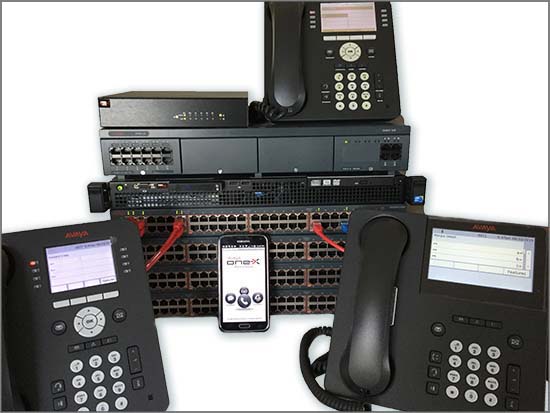
Who better to sell, program, install and train on Avaya IP Office than Bishop Computer. We've been around for all the different releases. We have technicians who are expert on the system and have knowledge of each release... Contact us today! 847.781.9475 The Avaya IP Office Platform is a cost-effective system that supports a mobile, distributed workforce with voice and video on virtually any device. IP Office is an integrated, modular communications solution that scales up to 3000 users and 150 locations in a multisite network with resiliency. Match a deployment model to infrastructure needs from simple appliances to dedicated servers to virtualized software in a data center. Improve customer experience and contact center agent efficiency with powerful, affordable multichannel functionality for voice, email, fax, SMS, and web chat. The solution combines collaboration software plus multichannel contact centers, networking, security and video. There is an IP Office to meet the needs of any small and midsize business. From the smallest enterprise with essential team engagement and mobile requirements, scaling up to sophisticated large enterprises requiring high levels of resiliency to support their customer engagement solutions.
IP Office R11 IP Office continues to evolve with Release 11. There have been significant advancements in security and resiliency, particularly for those that are interested in moving to cloud deployments. Avaya offers solutions from pure premises deployments, to pure cloud deployments. This offers flexibility for customers to start with a premises-based solution, move to cloud as a resiliency option, or start in cloud and still have resiliency on premises. As an added benefit, customers who are familiar and accustomed to analog line appearances, as with key system, may now deploy SIP trunks and program line appearance buttons on their phones. SIP Line Appearance will be supported on Essential Edition, Server Edition, Select and Powered By solutions. This makes it easier to migrate smaller businesses with analog line appearance to SIP trunked systems while preserving their user experience and business processes. Stronger
resiliency and security Enhanced
Collaboration For ease of use and enhancing the user experience, the new IP Office Web Client is a WebRTC based client that facilitates audio, video, Instant Messaging and Presence based collaboration between users in either a Chrome browser-based environment (Windows or MacOS) or as a standalone Windows client. Support of the new J169 and J179 IP phones will be added with R11.0. These two new IP phones will address the need for everyday voice communications. The Vantage Basic software client will also be supported and will introduce the all glass Vantage device to the Midmarket. R11.0 will also start the introduction of the Avaya Equinox™ client on IP Office. With R11.0 the Avaya Equinox™ client will be supported on IP Office as a softphone only (audio and video calling). Instant Messaging will be provided via Zang™ Spaces, presence will be provided via the IP Office core and there will be optional subscription available to Avaya Equinox™ Meetings Online for multi-party audio / video / web conferencing. While the Avaya Equinox™ 3.4 client will be a common client across both of Aura and IP Office (R11) platforms in the May timeframe – it is very important for all to understand that the client capabilities will vary, depending on the platform that the client registers to. This is down to different underlying architectures in each case. Summary of New Features Delivered in IP Office Release 11.0
Note: Features listed are available worldwide unless otherwise specified. Not all of the features in IP Office Release 11.0 are supported on all Editions, platforms and phones - please see each feature's description for details. Cloud portal APIs, SDKs and Example applications will be available with the Powered By Avaya IP Office R3.0 Cloud release. Upgrading
to IP Office R11.0 Customers operating earlier releases of IP Office software without an IPOSS contract will need to purchase an upgrade to get to IP Office R11.0/10.1. Supported
Releases Supported
OS and Browsers Operating System Editions and Service Packs
Server 2008R2 (64 Bit) is no longer supported Browsers
Notes: (2) Only on Server 2012 (note Server2012R2 supports IE11) (3) TBDs for Safari 10 will be updated post GA version of the R11.0 Offer document (4) Contact Recorder is no longer supported with R11.0.
Supported Hardware Platform and features supported on the platform will be modified with the IP Office R11.0 release. Supported platforms are:
IP Office software supports Server Edition hardware platforms; the Dell PowerEdge R630 server and the Dell PowerEdge R230 server are the most current servers available. The Dell PowerEdge R630 server support was introduced with IPO 9.1.4 SP (issued September 14, 2015). Note: IP OFFICE 500 VERSION 2 EXTENSION CARD ETR 6 will be targeted to end of sales in 2017. Please look forward to the End-of-Sales Notice for further details. Customers may migrate to IP Office R11.0 by purchasing an upgrade for Release 10 and applying the R11.0 software, or by acquiring an upgrade as part of their entitlement per the terms of their valid IP Office Support Services support contract, as applicable. Customers migrating to IP Office R11.0 will be required to have an IP500 V2 control unit or supported servers with Server Edition. IP500 base cards, trunk cards and expansion modules are supported with IP500 V2 control unit and may migrate to the V2 control unit. Licenses will require a dongle swap to move from the IP500 key card to the IP500 V2 SD card. All other Release 11.0 features are supported on all platforms. IP Office R11.0 Select features are supported with Select material codes. IP400
Trunk and Station Modules supported in IP Office R11.0:
NEW PHONES for R11.0
AVAYA
J169 IP PHONE
AVAYA
J179 IP PHONE
AVAYA Vantage™ 847.781.9475 |
|||||||||||||||||||||||||||||||||||||||||||||||||||||||||||||||||||||||||||||||||||||||||||||||||||||||||||||||||||||||||||||||||||
|
Avaya
IP Office R11 A lot of the time issues occur is because it is the way a system was programmed. There are so many IP Office programmers out there that are "expert" but really don't know how to program properly. That would entail no errors or programming that actually goes somewhere. A lot of programming we've seen is just all over the place. Time to clean it up. Sometimes issues aren't really issues and it boils down to the fact that IP Office doesn't always work the way an old PBX works. That's where training comes in. Learning to work with IP Office and the newer technologies will help you grow your business. Do you have employees / offices in different states or even countries? Do you have remote workers that work from home? It's time to grow and Bishop Computer is here to help. We
do a lot of remote support
as well as on site IP Office help in the Chicago and lower Wisconsin
areas. Call
Buy equipment only from an authorized Avaya Business Partner. Check the Avaya Business Partner Locator http://www.avaya.com/usa/partner-locator/ Put Chicago in the City area, check the Partner Name Box and type Bishop and enter. There we are. Many people claim to be business partners. It only takes a moment to verify. Email or call with any questions! Avaya
IP Office R11.0 IP
Office Sales, Installation and Support
Avaya
IP Office Remote Support
email: support@bishopcomputer.com A credential report can be sent to you verifying certification from Avaya. Don't just take someone's word that they are certified. |